
RISC Zero zkVM with Rust
Complete setup and proof generation guide for Ubuntu 24.04 — from first install to verified zero-knowledge proofs.
- System Preparation
- Installing Rust
- Installing the RISC Zero Toolchain
- Creating a New Project
- Writing the Guest Program
- Writing the Host Program
- Building the Guest Program
- Running Proofs (Dev & Production)
- Standalone Receipt Verifier
- Running the Verifier
- Cleaning & Rebuilding
- Deterministic Docker Build
- Common Issues
- Quick Command Flow
- Final Result
System Preparation
Update your system and install required dependencies:
sudo apt update
sudo apt upgrade -y
Install build essentials, LLVM toolchain, and supporting libraries:
sudo apt install -y \
  build-essential \
  curl \
  git \
  pkg-config \
  libssl-dev \
  clang \
  cmake \
  llvm \
  lld \
  protobuf-compiler \
  libclang-dev \
ca-certificatessudo apt install -y docker.io docker-buildx
export DOCKER_BUILDKIT=1
docker buildx create --use
docker buildx inspect --bootstrap
sudo systemctl enable --now docker
sudo usermod -aG docker $USER
newgrp dockerVerify everything is in place:
docker --version
git --version
clang --version
You should see something like this:

Installing Rust - Lets get rust......y'all!
Yikes.. not very funny
Install Rust via the official installer, then source the environment:
curl https://sh.rustup.rs -sSf | sh
source ~/.cargo/env
Update and add useful components:
rustup update
rustup component add rustfmt
rustup component add clippy
Verify:
rustc --version
cargo --version
Obligatory example...

Installing the RISC Zero Toolchain
Install the RISC Zero CLI and zkVM toolchain:
curl -L https://risczero.com/install | bash
source ~/.bashrc
rzup install
Verify:
rzup --version
cargo risczero --version
Lets see what we get this time. oh right.

Creating a New Project
Scaffold a new zkVM project and generate its lockfile:
cd ~
cargo risczero new my_project --guest-name guest
cd my_project
cargo generate-lockfile
Your project structure will look like this:
├── Cargo.toml
├── rust-toolchain.toml
│
├── host/
│ └── src/
│ └── main.rs
│
└── methods/
└── guest/
└── src/
└── main.rs
Writing the Guest Program
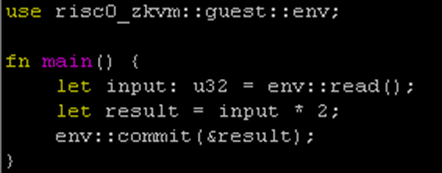
Open methods/guest/src/main.rs and replace its contents:
use risc0_zkvm::guest::env;

fn main() {
    let input: u32 = env::read();
    let result = input * 2;
    env::commit(&result);
}- Reads input supplied by the host.
- Performs a computation (doubles the value).
- Commits the result to the public journal for proof generation.
How its looking so far
Writing the Host Program
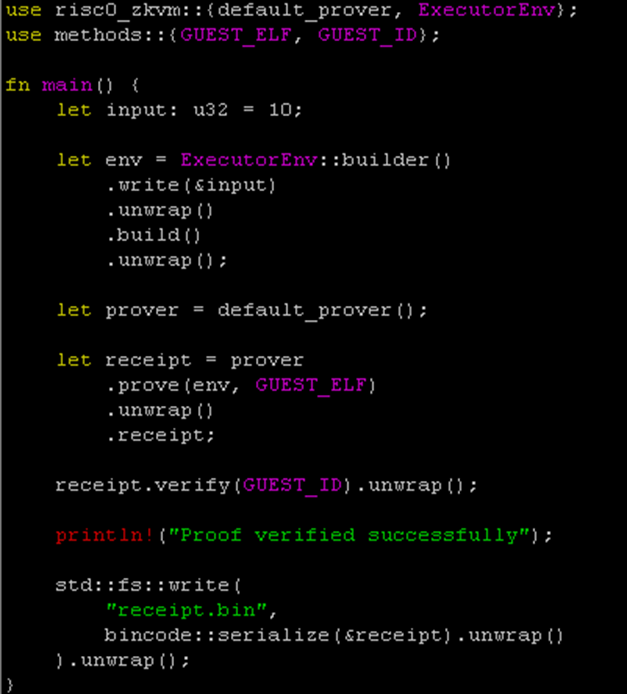
Open host/src/main.rs and replace its contents:
Rust · Hostuse risc0_zkvm::{default_prover, ExecutorEnv};
use methods::{GUEST_ELF, GUEST_ID};

fn main() {
    let input: u32 = 10;

    let env = ExecutorEnv::builder()
        .write(&input)
        .unwrap()
        .build()
        .unwrap();

    let prover = default_prover();

    let receipt = prover
        .prove(env, GUEST_ELF)
        .unwrap()
        .receipt;

    receipt.verify(GUEST_ID).unwrap();

    println!("Proof verified successfully");

    std::fs::write(
        "receipt.bin",
        bincode::serialize(&receipt).unwrap()
    ).unwrap();
}
- Sends the input value to the guest program.
- Executes the guest inside the zkVM.
- Generates and verifies the zero-knowledge proof.
- Saves the receipt to
receipt.bin.
Should have something like this now.
Building the Guest Program
Compile the guest program to a RISC-V ELF binary:
cargo risczero buildRunning Proofs (Dev & Production)
Development proof — fast iteration without full cryptographic overhead:
RISC0_DEV_MODE=1 cargo run --releaseProduction proof — generate a real, cryptographically secure proof:
unset RISC0_DEV_MODE
cargo run --releasereceipt.bin. It will take significantly longer than dev mode.
Standalone Receipt Verifier
Create a separate binary for verifying receipts independently:
mkdir -p host/src/binThen create host/src/bin/verify_receipt.rs:
Rust · Verifieruse risc0_zkvm::Receipt;
use methods::GUEST_ID;

fn main() {
    let data = std::fs::read("receipt.bin").unwrap();
    let receipt: Receipt = bincode::deserialize(&data).unwrap();

    receipt.verify(GUEST_ID).unwrap();

    let result: u32 = receipt.journal.decode().unwrap();
    println!("Receipt verified!");
    println!("Guest result: {}", result);
}
Running the Verifier
cargo run --release --bin verify_receiptGuest result: 20
Cleaning & Rebuilding
If builds fail or you need a fresh start:
cargo clean
rm -rf ~/.cache/risc0
cargo risczero buildDeterministic Docker Build
For fully reproducible builds, create a Dockerfile in your project root:
FROM rust:1.77

RUN apt update && apt install -y \
    clang cmake llvm lld protobuf-compiler

RUN curl -L https://risczero.com/install | bash

ENV PATH="/root/.cargo/bin:${PATH}"

WORKDIR /app
COPY . .

RUN rzup install
RUN cargo risczero build

CMD ["cargo","run","--release"]
Build and run:
docker build -t risczero-demo .
docker run risczero-demoCommon Issues
Error: linker 'clang' not foundFix:
sudo apt install clang llvm lld
Error: cannot find GUEST_ELFFix: Run
cargo risczero build before executing the host.
Fix:
sudo usermod -aG docker $USERnewgrp docker
Quick Command Flow
# System deps
sudo apt update && sudo apt upgrade -y
sudo apt install -y build-essential curl git pkg-config \
  libssl-dev clang cmake llvm lld protobuf-compiler \
  libclang-dev docker.io

# Rust
curl https://sh.rustup.rs -sSf | sh
source ~/.cargo/env

# RISC Zero
curl -L https://risczero.com/install | bash
source ~/.bashrc
rzup install

# Project
cargo risczero new my_project --guest-name guest
cd my_project
cargo risczero build

# Dev proof
RISC0_DEV_MODE=1 cargo run --release

# Production proof
unset RISC0_DEV_MODE
cargo run --release

# Verify
cargo run --release --bin verify_receiptFinal Result
What you've built ✓
receipt.bin containing a ZK proofNext steps →
- Remote or GPU-accelerated proving
- Proof verification API
- On-chain verification (e.g. Ethereum / Solana)
- CI pipelines for proof validation